
Adaptive Ergonomics - UNITE2BWELL
- Steve Longhorn

- Jun 1, 2021
- 5 min read
Updated: Nov 12, 2021
Traditional ergonomics focuses on matching human, social and technological components to reduce the risk of injury and improve performance. Yet, the changing nature of work and the move towards hybrid working models, means we must equip ourselves with the basic knowledge to safely adapt to working from a range of work spaces or environments. Each of which, will present there own unique challenges in supporting well-being and performance.
Many companies provide ergonomic equipment and training for the fixed office environment. This however, is not the case for the remote working environment. Although employers (certainly within the EU) have a duty of care to ensure safe working practices in all work environments. The remote working environment, is not getting the attention in needs.
Adaptive Ergonomics: Think - Plan - Adapt
When working from a variety of environments, you should think about the specific activities being carried out and link these activities to spaces that best supports each activity. Although the basic ergonomic principles remain the same, you may need to be creative in setting up the remote workspace, in order to reduce the risk of injury.
If working from the kitchen table is the only option, and with only the basic level of ergonomic accessories (separate keyboard & mouse). Try to adapt your workspace using cushions, shoe boxes or any other stable objects in order to create a safe working posture (see image below).
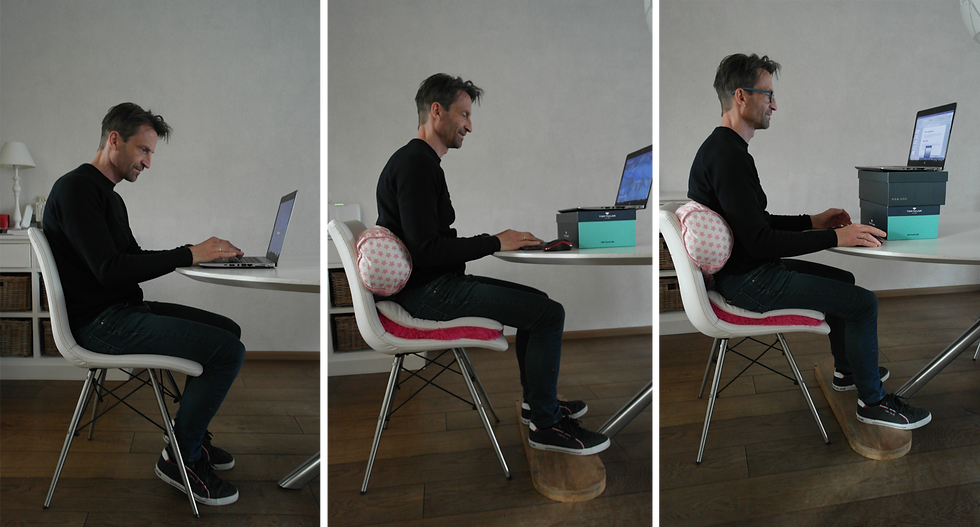
Tips:
Think about the tasks or activities you will be undertaking this week.
Which space or spaces will best support these activities (plan ahead & adapt)?
What additional equipment is required to help improve performance and reduce risk?
Do you have control over certain environmental factors i.e. lighting, temperature?
Physical Elements
Rather than focusing on one space to fit all task, think about each task you'll be performing during a given day, and search for the most suitable space to support each task. Generally speaking, focused work is best supported while sitting or standing in a reasonably quite space, with adequate levels of lighting, temperature and noise to support cognitive performance.
If you do not have a sit-stand desk, then look for a raised surface where you can comfortably stand during a call, or an online training session. Remember, be creative and use a laptop stand or any other stable accessory to raise your laptop screen or monitor, to just below eye level.
For more informal tasks, or for calls with your direct team members. You may want to switch to a more relaxed setting or better still, take the call with you during a walk.
Tips:
Thinking creatively! Are there opportunities within the remote environment to set-up and support the following?
Focused space: A separate room, or space where you can work undisturbed.
Standing space: A raised surface (breakfast bar) if you do not have a sit-stand desk.
Informal or collaborative work space: Kitchen table (space to spread out paper).
Relax area: A space to relax & reflect.
Mental Elements
The way we work is changing rapidly. This requires a flexible approach to helping employees transition and manage their physical and mental health. Working remotely not only provides the flexibility to manage one's time better, the remote environment in many cases, offers employees more control over certain environmental elements, such as air quality & noise. In many cases, its far easier to personalize the remote work environment than it is, the traditional office space.
Studies within the remote work environment have indicated performance gains when individuals view their working environment(s) as being appealing or more suited to their individual needs. We all understand that happiness is linked to increased performance and well-being so there is a definite benefit in personalizing your workspace. Additionally, eating healthily, adequate sleep, being active and drinking plenty of fluids throughout the day will help to maintain and improve energy levels.
Tips:
Search for spaces that help stimulate energy at various times of the day.
If you're a morning person! Plan your focused work during the mornings periods.
Opening windows (for fresh air) may also help to stimulate cognitive performance.
Lighting levels for certain times of the day or for specific tasks, may also help to manage energy levels AND reduce the strain on the muscles surrounding the eyes, used for focusing on objects and text.
5 Basic Guidelines For A Safe Remote Workspace
If possible, adjust the height of your desk surface keeping shoulders relaxed and your lower arms at approximately 90 degrees in relation to the desk surface. If the desk surface is static and slightly too high, raise the chair until (as mentioned above) your arms are at approximately 90 degrees in relation to the desk surface. If you are unable to keep your feet flat on the floor, then look for a low stable object that you can place under your feet.
Raise your screen (or if working with a laptop) place the laptop on a raised surface so that the screen is slightly below eye level, and use a separate keyboard and mouse.
Ensure your back is supported by the chairs back rest and sit upright. In the remote environment, using a rounded cushion or rolled bath towel may help you to improve the support to your lower back, especially if working from a kitchen table/chair.
Move your keyboard forward slightly and rest your forearms lightly on the desk surface. Pull your chair close to the desk so that your stomach is almost touching the edge of the surface, and keep your shoulders relaxed, with your feet flat on the floor. In this position, you are less likely to bend forwards with the force of your upper-body on you forearms. Your back will also be supported in this position, by the chairs back support.
keeping the screen at approximately an arms length away from the monitor or screen is generally speaking, good practice.
Note: The above are only very basic tips to get you started.

Additional Advice For Working In The Remote Environment
Keep active to reduce the impact of a static posture. Plan stretching and active time into your working day. Also, eat, drink & relax at regular intervals to help maintain your energy levels.
Use an external keyboard and mouse if working for more than 1 hour at a time on your laptop.
Never work with a laptop for more than 2 hours without taking a break of at least 10-15 minutes. This could also be an active break e.g. a walking meeting etc.
Plan your working day effectively, so that you are not working on your laptop for more the 6 hours in total.
Choose a working environment that best supports the task you need to perform. Think about Light levels, space, air quality & noise.
Focused work will require a different set-up than collaborative work. Try to find a number of alternative set-ups within the remote space to support various tasks and to stimulate active movement during the day.
If your partner or room mate is also working from home! Rather than fighting over who claims the focused workspace, discuss and plan together the activities you both need to carry-out and utilize the additional spaces around your living environment.
If you would like more advice around setting up the remote work environment or for company training sessions. Please reach out using the link below.


Comments